
Pay-stub laws keep tightening. In 2025, stricter state rules and fresh IRS tables put every paycheck line under the microscope. New York now lets employees sue for up to $250 per worker, per day when wage statements are missing or wrong.
To help you avoid those penalties—and generate audit-ready records in minutes—we asked an employment lawyer to vet seven of the best pay-stub generators. We’ll grade each tool, including the FormPros pay-stub generator, on compliance, cost, and everyday ease so you can choose with confidence.
- Why accurate, compliant pay stubs matter
- 2024–2025 legal changes you can’t ignore
- How we picked the winners: the six-factor scorecard
- Best Pay-Stub Generators for 2025 Compliance
- Compliance test case studies: real-world results
- At-a-glance scorecard
- Seven-point compliance checklist
- Conclusion
- Frequently asked questions
Related Articles
-
 7 Tips to Align Payroll and HR Policies with Changing Employment…
-
The Legal Risks of Inaccurate Bookkeeping in Employment Practices
-
The Role of IT Solutions in Enhancing Compliance with Employment…
-
Best Practices for Payroll Management Across Jurisdictions
-
Top Features to Look for in a Payroll Management System
-
6 Benefits of HR RPA in Improving Operations
-
Choosing the Right HR System: From Basic Management to Strategic…
-
Best Pay-Stub Generators of 2025: Lawyer-Reviewed Tools for Error…


Why accurate, compliant pay stubs matter
Why does a single line on a pay stub matter to you? A pay stub is a legal receipt that shows exactly how every dollar in a paycheck is calculated. Miss one required field, and penalties start piling up fast.
Most states demand the same basics: employee name, pay-period dates, gross wages, itemized taxes and deductions, employer contributions, and net pay. Many also require overtime hours, bonuses, and any paid-time-off balance, according to payroll provider Patriot Software.
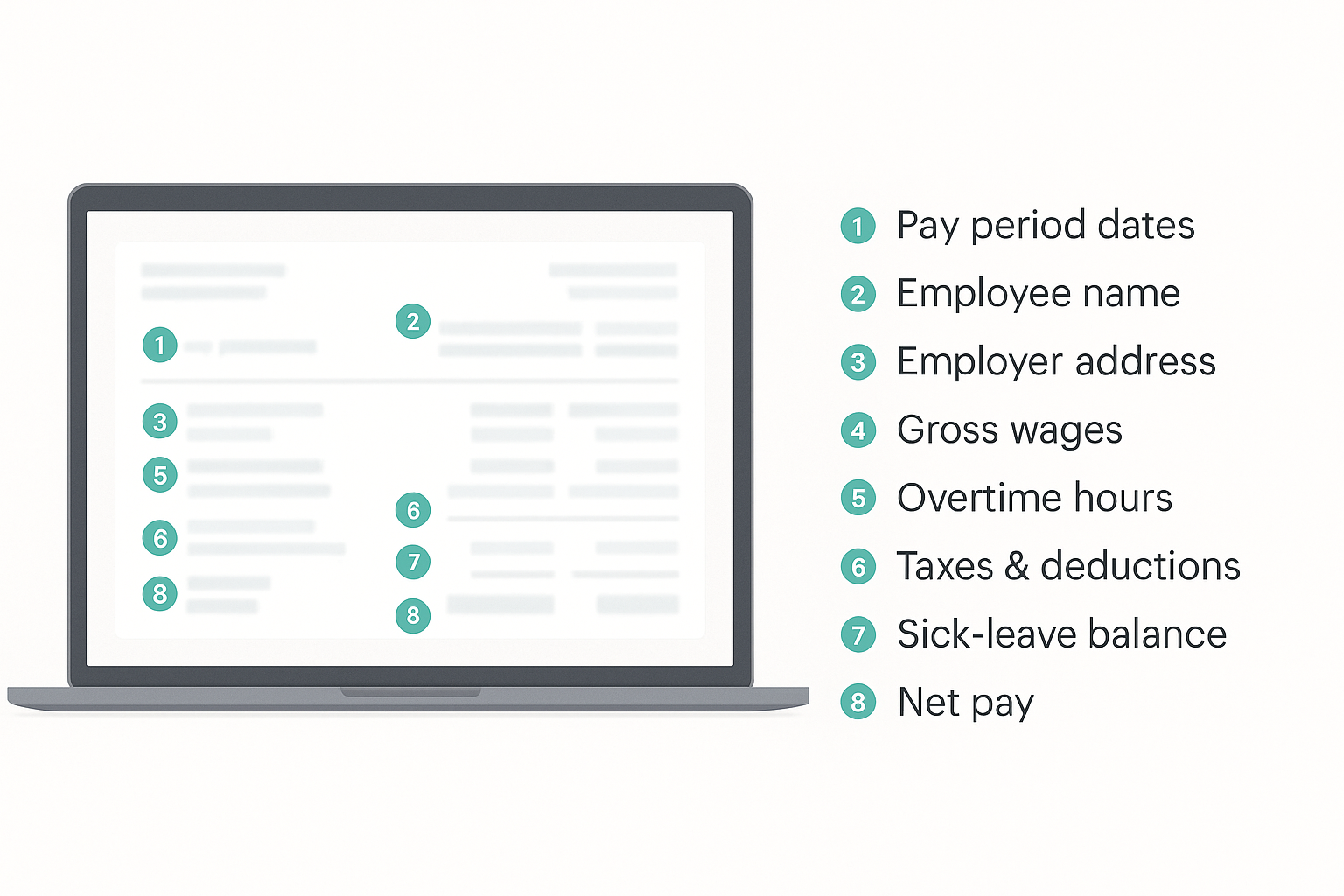
The cost of omission is real. According to the New York Department of Labor, the Wage Theft Prevention Act lets workers claim up to $250 per employee per day, capped at $5,000, until you issue a correct stub. California Labor Code section 226 adds $50 for the first faulty period and $100 for each one after, up to $4,000 in statutory damages, plus attorneys’ fees.
Fines are only part of the headache. Banks, mortgage underwriters, and landlords increasingly reject statements that omit hours worked or an employer address, forcing employees to chase corrections and eroding trust in your business.
That’s why our scorecard ranks legal completeness above price or design. Get the details right once, and every future payday runs smoothly. Miss them, and every check becomes a lawsuit waiting to happen.
2024–2025 legal changes you can’t ignore
Over the last 18 months, three states rewrote their wage-statement rules, and the changes carry real penalties.
Illinois (Public Act 103-0953). Beginning January 1, 2025, every employer must provide workers an itemized pay stub each payday, show hours, pay rates, and overtime, and keep copies for three years. Workers may request duplicates twice each year. The act shifts Illinois from an “access” model to a mandatory disclosure model.
Maryland (SB 38, Chapter 305). Starting October 1, 2024, even a sole proprietor must issue written or electronic statements that list employer details, pay-period dates, hours, regular and overtime rates, gross pay, net pay, and deductions. The state labor commissioner may fine up to $500 per employee for non-compliance.
California (SB 616, Paid Sick Leave amendment). As of January 1, 2024, the minimum annual sick-leave entitlement increased from three to five days, and the remaining balance must appear on every wage statement. Omitting it violates Labor Code section 226, which already allows $50 in statutory damages for the first offense and $100 for each one after, up to $4,000.
Ignore these updates, and your pay-stub generator could turn each payroll run into an instant liability.
How we picked the winners: the six-factor scorecard
Marketing copy can make any stub look legal, so we dug deeper. Each generator earned a score in six areas that decide whether payday is stress-free or a scramble.
- Compliance and accuracy. The software must use current federal and state tax tables, prompt for every required field, and format overtime or sick-leave lines correctly. If the math is wrong, nothing else matters.
- Ease of use. A step-by-step wizard and live preview reduce data-entry mistakes and let you fix typos before paying.
- Export flexibility. PDF is a given; bonus points for CSV downloads, QuickBooks-ready files, or batch output for year-end forms.
- Pricing. We compared per-stub costs, subscription tiers, and hidden fees. Cheap is not a bargain if you later hire a lawyer to correct errors.
- Human support. Payroll questions appear at odd hours, so live chat or responsive email ranks higher than a dormant forum.
- Security. Generators handle Social Security numbers and wages, so we looked for HTTPS, clear privacy policies, and third-party audits such as SOC 2 or ISO 27001.
Stacked together, these pillars reward tools built for 2025 rules, not 2019 shortcuts. Next, you will see which platforms cleared the bar.
Best Pay-Stub Generators for 2025 Compliance
FormPros online pay-stub generator
FormPros feels like an on-call accountant. You enter wages, choose a state, and the engine autocalculates federal, state, and local taxes in seconds. The wizard prompts for overtime hours, sick-leave balance, and the employer EIN, so required fields stay visible.
A live PDF preview refreshes with every keystroke, letting you spot and fix typos before checkout. In our California test (hourly pay, overtime, five-day sick-leave balance), each number landed in the proper column on the first pass.
Cost is simple: $8.99 per stub with bulk discounts for multi-stub purchases. Support is offered through live chat and email on weekdays. All transactions travel over HTTPS on secure servers.
If you want guided compliance plus an editable preview, FormPros pairs accuracy with a gentle learning curve.
ThePayStubs
ThePayStubs swaps bells and whistles for pure speed. You enter wages and withholdings in a single form, preview the layout, and download a PDF in about two minutes; our timed test finished in 1 minute 45 seconds on a standard connection.
Taxes calculated correctly for all 50 states, and the preview lets you zoom before payment. Customization sticks to one template, so extras like sick-leave balance or tip income need a manual note. That worked for our Texas salaried-manager scenario, but restaurant or California retail employers may want more flexibility.
Price is $8.99 per stub with occasional “buy 4, get 1” promotions. Support is available by live chat, phone, and email, and the company advertises 24/7 response time. All transactions run over HTTPS through a PCI-compliant gateway.
Bottom line: pick ThePayStubs when you need a one-off, straightforward stub quickly and can live with a single template.
123PayStubs
123PayStubs is built for volume. The dashboard feels like mini payroll software; set up your company once, add employees to an address book, and generate stubs in bulk.
In our test we uploaded 10 employees, clicked Generate, and received compliant PDFs in 4 minutes 30 seconds. Federal, state, and local taxes updated automatically, and each stub stored in the cloud for easy year-end W-2 transfer.
Cost is the big draw: the first stub is free, and each additional stub costs $3.99. Optional add-ons such as overtime or tip-income fields run $1–$2 each, so weekly payroll can stay under $20 for a 10-person team. Support is available by chat and email Monday–Friday, 9 a.m.–6 p.m. ET (no weekend coverage).
Security is built in. Every session runs over HTTPS, and payments flow through a PCI-compliant Stripe gateway.
If you are willing to learn a dashboard in exchange for low pricing on high-volume payroll, 123PayStubs delivers strong value.
PaystubCreator
PaystubCreator prizes speed over frills. A single-page form collects wages, hours, and state, then calculates taxes instantly; no account or template selection is required. In our tests it handled three scenarios (California hourly, Texas salary, Nevada tipped) without math errors, although extras such as sick-leave balance or tips must be added in a notes field.
Pricing is straightforward: $11.99 per stub with no subscriptions or hidden fees. Support arrives by email, usually within 24 hours, and all data travels over TLS/SSL. The platform deletes entered information once you leave the page, reducing retention risk.
Bottom line: when you need a one-off, accurate stub in under two minutes and can live with minimal customization, PaystubCreator gets it done.
PayStubsNow
PayStubsNow aims to be a one-stop document shop. The three-step flow—fill, preview, download—works smoothly on desktop and mobile. In testing we added tip income, uploaded a logo, and generated a Nevada server stub in 2 minutes 40 seconds.
Compliance held up: the calculator used 2025 federal brackets and let us itemize tips through a custom-earnings field. Each finished PDF is archived in your dashboard, helping you meet state record-keeping rules without extra clicks.
Pricing is mid-range: $7.95 per stub before discounts, and site-wide promo codes often cut the cost to about $5. PayStubsNow shows a 4.4-star average from more than 1,085 Trustpilot reviews, giving the service solid social proof. Support staff respond through 24/7 live chat, and all transactions run over HTTPS on a PCI-compliant gateway.
If you want a modern interface plus built-in document storage and you do not mind hunting for a coupon, PayStubsNow is an attractive middle-of-the-road pick.
Compliance test case studies: real-world results
Marketing claims mean little unless the stubs survive a legal audit. We built three stress tests based on tricky statutes:
- California hourly worker with overtime and a five-day sick-leave balance (Labor Code §226)
- Salaried exempt manager in Texas, which has no state income tax
- Nevada tipped server whose reported tips must be taxed under FICA rules
Every generator faced the same inputs. Here is how they performed, starting with California, the strictest of the group.
Case 1: hourly employee in California (overtime + sick leave)
Maria is a retail associate in Los Angeles who earns $18 an hour. Last pay period she logged 80 regular hours, 6 overtime hours, and carried 24 hours of sick leave. Under California Labor Code §226, each figure must appear, itemized, on her wage statement.
FormPros. Forced separate entries for regular and overtime hours, auto-calculated 1.5× pay, and displayed a “Sick-leave balance” line that matches the state’s sample stub.
ThePayStubs, PaystubCreator, PayStubsNow. Calculated overtime correctly but lacked a sick-leave field. We added the balance in an “Additional notes” box—legal but easy to overlook.
123PayStubs. Similar workaround through its “Other earnings” label; accuracy depends on the user remembering to add the field.
Takeaway. Every tool got the math right, yet only FormPros surfaced sick-leave data by default, critical if your California workforce tracks PTO and overtime each cycle.
Case 2: salaried exempt manager in Texas
John manages a Dallas restaurant and earns $2,115 every two weeks. Because Texas has no state income tax, his pay stub needs only federal withholding, Social Security, Medicare, the pay-period dates, and employer details.
Results. All six generators produced a stub with no state-tax line, and federal withholding matched the 2025 IRS Publication 15-T tables to the dollar.
- FormPros and PayStubsNow labeled the pay line “Salary” and left hours blank, clean for an exempt role.
- ThePayStubs, PaystubCreator, and 123PayStubs defaulted to “80 hours,” which is legal but looks odd for salaried staff.
Takeaway. For straight-salary employees in states without income tax, every tool is accurate. Choose based on price, support, or whether you prefer a stub that hides, or shows, hours worked.
Case 3: tipped server in Nevada (tip income on the stub)
Jasmine is a Las Vegas server earning $11.25 an hour plus $200 in reported tips last pay period. Nevada has no state income tax, but the IRS still requires FICA on both wages and tips. Her pay stub must separate cash wages from gratuities.
FormPros, 123PayStubs, PayStubsNow. Each offered a dedicated Tips or Additional earnings field; Social Security and Medicare recalculated automatically, meeting the rule.
ThePayStubs, PaystubCreator. Tips had to be folded into gross pay. The math was correct, but the stub no longer showed how much income came from gratuities, an issue when Jasmine audits tips or applies for a loan.
Takeaway. All generators handled the tax side, yet only four provided transparency by labeling tips separately. If your team earns gratuities, or any variable income, choose a tool that itemizes those dollars.
At-a-glance scorecard
| Pay-stub tool | Compliance & accuracy | Ease of use / integrations | Typical price* & support |
| FormPros | Passes 50-state checks; includes sick-leave & tip fields | Guided wizard, live preview; PDF, CSV workaround | $8.99 per stub (bulk discounts) · Live chat & email (Mon–Fri) |
| ThePayStubs | Accurate taxes; limited custom fields | One-page form, very fast; PDF output | $8.99 per stub (buy-4-get-1 promo) · 24/7 email & chat |
| 123PayStubs | Multi-state, batch mode; tax tables updated | Dashboard with employee vault; PDF + feeds to W-2/1099 | First stub free, then $3.99 · Chat & email (Mon–Fri, 9 a.m.–6 p.m. ET) |
| PaystubCreator | Accurate basics; extras added via notes | Single-form, no account; PDF output | $11.99 per stub · Email (24-hour reply) |
| PayStubsNow | Tip & custom-earnings fields; IRS-2025 tables | Three-step wizard; mobile-friendly; PDF auto archive | $7.95 per stub (~$5 with coupon) · 24/7 live chat |
If compliance tops your list, choose FormPros. For volume savings, 123PayStubs is the clear budget pick, while PayStubsNow pairs mid-tier pricing with built-in archival storage.
Seven-point compliance checklist
Run any pay-stub generator through these seven questions before you buy. A “no” on even one is a red flag.
- Are state-specific fields automated? Overtime and sick-leave prompts in California, or the employer address line in Maryland, should appear without manual work-arounds.
- Does the tool use current tax tables? Look for explicit reference to 2025 IRS brackets and the $168,600 Social Security wage base. Out-of-date math equals instant non-compliance.
- Can you edit before paying? A live preview should let you fix a mistyped SSN or pay-period date—no paid do-overs.
- Is data security documented? Confirm HTTPS, a plain-language privacy policy, and ideally an outside audit such as SOC 2 or ISO 27001.
- Will past stubs stay accessible? The FLSA requires payroll records for three years, and California extends that to four, so make sure you can re-download PDFs on demand.
- Does the provider explain electronic-consent rules? Opt-in states such as New York require written employee consent for e-stubs; a good platform surfaces that reminder.
- Do real users say banks accept the stubs? Scan Trustpilot, Reddit, or mortgage forums for “approved” or “accepted by underwriter.” Social proof beats marketing copy.
Conclusion
In 2025, compliance is no longer optional—it is a daily operational risk. Illinois, Maryland, and California have each tightened wage-statement rules, while the IRS has updated tax brackets and withholding guidance. As our case studies showed, even small formatting oversights—like omitting sick-leave balances or failing to itemize tips—can expose employers to fines, lawsuits, or rejected documentation when employees apply for credit.
The good news is that modern pay-stub generators can eliminate these risks when chosen carefully. Across our scorecard, tools such as FormPros stood out for surfacing state-specific requirements by default, while 123PayStubs proved best for high-volume teams, and PayStubsNow offered a balance of features with archival storage. Others, like ThePayStubs and PaystubCreator, remain strong for quick, one-off use cases but require more manual diligence in complex scenarios.
For HR leaders, small-business owners, and attorneys advising clients, the takeaway is clear: don’t assume your current stub process meets 2025’s higher bar. Use the seven-point compliance checklist to audit your existing provider or adopt one of the profiled platforms that passed our legal tests. By doing so, you’ll protect your business, reassure your workforce, and ensure that every paycheck is not just timely but legally defensible.
Frequently asked questions
Are online pay-stub generators legal to use?
Yes. They’re legal when you use real wages and tax data. Problems arise only if someone fabricates income.
Can a stub generator replace full-service payroll software?
For freelancers or very small teams, yes. It handles calculations and wage statements. Larger teams needing direct deposits and tax filings should use full-service payroll software.
Why pay for a stub when free templates exist?
Free tools rarely update tax tables or include state-specific fields. A few dollars saved now can cost hundreds in fines or loan denials later.
Can I generate stubs for past pay periods? Most paid tools let you backdate pay stubs, as long as the information reflects actual hours and pay.
Will banks and lenders accept generated stubs? Yes—if they are accurate and compliant. Using a reputable generator that applies current laws greatly reduces the risk of rejection.
Do employees need to consent to electronic pay stubs? In some states, yes. For example, New York requires written consent before delivering wage statements electronically. Always confirm your state’s rules.